Latest

Telerik Unveils Powerful Sitefinity 4.0 Content Management Solution

Recent Mallsoft acquisition lays foundation for advanced Sitefinity e-commerce functionality

WALTHAM, MA, JANUARY 17, 2011 –Telerik, an end-to-end provider of software application lifecycle and content management solutions today announced the launch of Sitefinity 4.0, the newest edition of its powerful, scalable Content Management System (CMS). The platform’s redesigned product architecture delivers an array of enhancements, like advanced workflow control for better business process management and improved ease-of-use, generating considerable productivity gains of up to 70 percent. Underscoring its commitment to meeting the needs of customers developing commercial websites, Telerik also announced its recent acquisition of Mallsoft, leading developers of e-commerce shopping cart technologies. The acquisition lays the groundwork for the integration of advanced e-commerce functionalityand a robust system for handling online stores within the Sitefinity platform.

“This is the culmination of many years of real-world experience, extensive time and resources invested in product R&D, and in gathering customer feedback. Additionally, with new frameworks supporting Mallsoft’s e-commerce technologies, users have the ability to fully manage all aspects of their online business, from corporate websites to intranets to online stores. Sitefinity 4.0 has matured into one of the market’s most powerful, comprehensive, and highest quality content management solutions being shipped today,” said Martin Kirov, executive vice president of Sitefinity atTelerik. “By minimizing complexities while providing robust tools and innovative features addressing every aspect of the site building and management experience, Sitefinity 4.0 enables users to quickly, easily, and efficiently optimize their web presence.”

Houston's Southwest Drupal Summit is Coming

There are a lot of good conferences taking place this Spring and Summer, but what do you do for the Winter months?  If you're smart, you start looking for a conference in warmer climate. If you're a Drupal enthusiast (we'll assume you're already smart) then you have to consider attending the two-day Southwest Drupal Summit in Houston, Texas. This January 27-28, 2011 conference brings Drupal experts, novices, and business leaders together to share successes, explore opportunities, and learn more about why and how Drupal is making headlines across the world as a superior enterprise-level web application platform.

Intersoft Solutions Releases WebUI Studio 2010 R2

Intersoft Solutions today announced the official release of WebUI Studio® 2010 R2, the world’s most advanced presentation layer toolset for ASP.NET, Silverlight and WPF application development. Featuring over 60 new rich controls for Silverlight and WPF platform, and dozens of new business-inspiring samples, developers can now rapidly build cross-platform applications with the next-generation user experiences, while at the same time leveraging the best practice in architectural design pattern.

With the new R2 release, WebUI Studio® delivers a total of 280 high quality UI components for ASP.NET, Silverlight and WPF development, setting its position as the world’s most comprehensive user interface library suite available today.

Joomla!® 1.6.0 is available for immediate download

Joomla, the world’s most popular open source CMS (content management system), announced the immediate availability of Joomla 1.6. Users will be able to download the latest version effective this evening from the Joomla website. Designed to offer enhanced site control and a more polished user experience, Joomla 1.6 delivers a variety of new tools to improve website management and access, a more robust organizational structure for content control, and various other user-experience improvements throughout the software.

Learn more about Joomla 1.6.0

“With new features and capabilities such as the hierarchical design of the access control system, semantic XHTML layouts, one-click extension updates and multi-language functionality, Joomla 1.6 has evolved to become the most user-friendly and powerful tool to develop a web presence,” said Ryan Ozimek, president of Open Source Matters, a not-for-profit created to provide organization, legal, and financial support to the Joomla project. “This has been accomplished through the tireless feedback and work on 1.6 by the thousands of members of the Joomla community over the past year.”

Joomla’s ease-of-use and extensibility has made it the most popular and downloaded open source website software in the industry today (it has been downloaded more than 22 million times). It is used for everything from small personal websites to the backend management for some of the largest enterprises and highest traffic sites on the Web, including sites operated by Citibank, eBay, General Electric, Harvard University, Ikea, McDonald’s and many more.

Key Features in Joomla 1.6:

  • New Access Control System – Allows site administrators control over who can view and manage content.
  • Unlimited Depth Organizational Model – Gives site administrators and content creators user-defined category levels that allow for the creation of a category tree with as many or as few levels for organizing articles and other content as needed.
  • One-Click Extension Updates – Allows users to keep sites secure and controlled by simplifying the process of updating extensions.
  • Semantic XHTML Layouts – Provides a better baseline for content presentation.
  • Multi-language Functionality – Allows site builders to implement a multi-language site.

In addition, developers and implementers will enjoy the new ability Joomla 1.6 provides in allowing extensions to be built with granular control and permissions. This makes it easier to create more advanced, enterprise-focused applications and extensions for Joomla. Furthermore, there are numerous improvements in areas like code reuse, and considerable success in ensuring the stability of application programming interfaces via unit testing.

“The current Joomla Platform provides developers with the tools they need to rapidly build the Web of the future,” said Ron Severdia, a member of the Joomla production leadership team. “Although 1.6 is being released today, the Joomla production team is not resting on its laurels. We’re hard at work developing even more powerful Joomla features for the future, such as new search capabilities and new ways to leverage website content.”

Visit https://www.joomla.org/ to download Joomla 1.6 today.

Drupal 7 has been officially released

After three years of open source development, Drupal 7 has finally been released to the public. As Ric Shreves previously mentioned in his article, there are literally hundreds of changes in Drupal 7. I've included below a list of the more significant changes from Drupal 6 to Drupal 7. I've also included a nice Drupal 7 marketing video via Jeff Robbins at the bottom of this post. Also there is always official Drupal 7 announcement for additional information on this latest version of Drupal.

Get started with Drupal 7Barring any unforseen changes to how I manage this site, I expect we will be upgrading CMSReport.com from Drupal 6 to Drupal 7 within the next few months. I've been playing with Drupal 7 off and on this past year, but I must confess I haven't been as aggressive in my testing of this version of Drupal as I was with Drupal 6.

Some of the more significant changes in Drupal 7 since the release of Drupal 6 include:

1. Overhaul of the User Interface

Work has been done to improve the user experience and administration interface. The new administration theme "Seven", the overlay module, the dashboard and the configurable shortcut bar, all lead to a much more user-friendly interface.

2. Custom Fields

Drupal 7 bundles in the ability to add custom fields, similar in functionality to the Content Construction Kit (CCK) module. However, fields are no longer limited only to content types; they can be added to users, taxonomy terms, and other entities. Fields also have support for translations.

3. Image Handling

Drupal 7 brings native image handling to core. Image fields may be added to content, and have image styles applied to them, such as scaling, cropping, and other effects.

A First Look and Review of Drupal 7

Editor's Note: The following aritlce is authored by Ric Shreves and first appeared online at  Open Source CMS Pro. Permission has been granted to repost the article here at CMSReport.com.

Now that Drupal 7 has gone through a couple of Release Candidates, we feel confident that what we can see on the screen today represents very closely what everyone can expect in the final Drupal 7 production release. So, with some certainty at our backs and the release date just around the corner (we hope!), we thought it was time for us to present a Drupal 7 “first look,” that is, an overview of what everyone can expect from the new Drupal 7.

There are literally hundreds of changes in Drupal 7. Many of those changes are “minor” in the eyes of most users, indeed, they are essentially invisible. This doesn’t mean those small changes aren’t important, simply that they aren’t on the radar for the average user. In this article we are going to focus on just the highlights, in three key areas:

  • Changes visible on the surface
  • Extensions of the Admin functionality
  • Enhancements to the technical infrastructure

On the Surface

The first thing you notice when you fire up Drupal 7 is a new look and feel. For the first time in years, the release includes new themes. The only holdover from previous releases is the Garland theme, which has been updated to be Drupal 7 compatible. The new themes include:

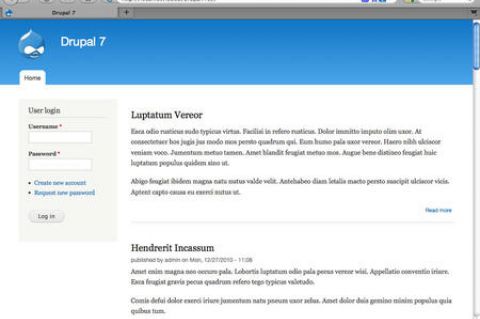
  • Bartik: The new default theme. Shown in the screenshot on the left.
  • Seven: The new admin theme, seen in several of the screenshots, below.
  • Stark: A new starter theme, intended for jumpstarting theme creation efforts via sub-themes.

Of the four themes (three new ones + Garland), only Garland and Bartik are ready to use on the front end of the site. Stark is purely a base theme, barren of all styling excepting only the default system styles. Garland remains, well, Garland; it's basic and offers not a lot. Bartik is a big improvement with more than a dozen regions (module positions) available. Still, visually, Garland and Bartik are not worlds apart. Some additional variety would have been nice. (We note that the theme Corolla, which was included in earlier Drupal 7 beta releases did not make the final cut, sadly.)

The inclusion of a base theme (Stark) is a nice move -- giving themers who don't want to use Zen (or other external starter themes) an easy way to build their own themes via sub-theme creation. One of the most welcome changes in Drupal 7 is the revision of the administration interface. This is not a minor tweak – this is a complete revision of both the interface and the information architecture. Long overdue, I think we all can agree…
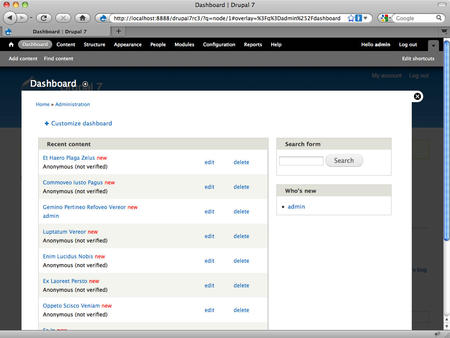
The new look of the Drupal 7 admin system The new admin interface includes not only its own dedicated theme (Seven), but also a new overlay, toolbar and shortcuts menu, as shown in the screenshot, at right. The overlay gives you a light box approach to the admin layer, preserving in the background the front-end theme. Having a dedicated theme for the admin system is a huge improvement in usability for the system and that alone would be reason to celebrate, but changes don’t stop there.

The new toolbar is anchored to the top of the browser window, reminiscent of the popular Admin Menu module many of us used in the past. There is also a configurable shortcuts menu present on the bottom edge of the toolbar; you can add your own favorites to the shortcut menu. A related improvement in look and feel is the inclusion of the Vertical Tabs functionality in the core. The functionality improves usability and reduces admin system clutter.

The Drupal team has also taken a fresh look at the admin system’s labels and information architecture. They’ve cleaned things up, eliminated redundancies and clarified labels. All in all, the admin system changes finally bring Drupal into a state of usability that will make the system much more accessible for many non-technical users.

The final area I want to highlight is a set of minor changes that will be meaningful to old Drupal users. Drupal 7 has “cleaned house” and done away from some of the legacy features that, frankly, weren’t of much utility. Gone in Drupal 7 are the Mission Statement functionality and the Footer Message. The site Search is now simply a block, instead of having two different versions of the same functionality. Also gone is the Theme Switcher option for users. Again, changes that clean things up, reduce complexity, and improve usability of the system as a whole.